

Add a customizable and searchable member directory to Squarespace with or without a map. Squarespace does not offer a member directory as part of its Member Area features. However, with a Squarespace directory plugin like MembershipWorks, you can easily add a directory to your Squarespace website.
In this article, we’ll explore:
- How to add a directory to Squarespace
- What you can achieve with a Squarespace member directory
- Why you should have a business directory on Squarespace
- Customizing your Squarespace directory
- Identifying the best Squarespace directory plugin
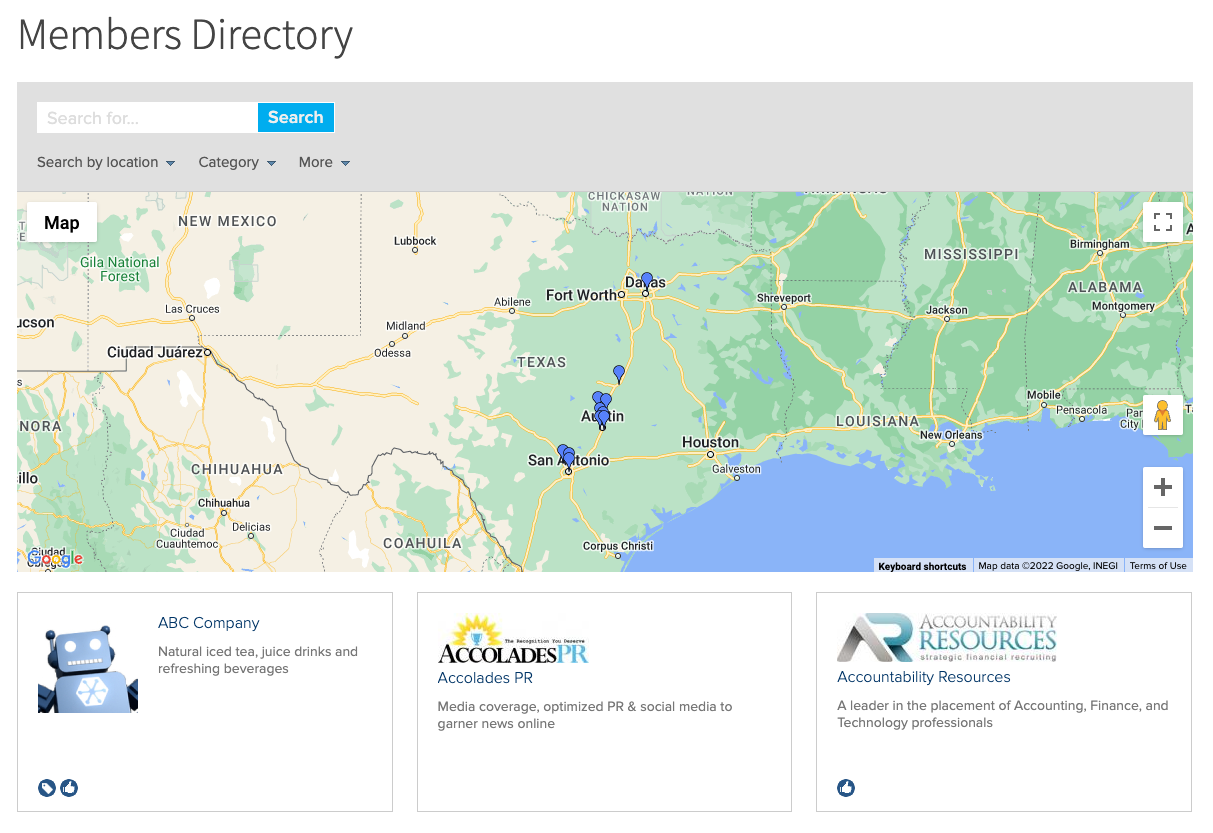
See a Squarespace directory sample site.
How to add a directory to Squarespace
Creating a directory is straightforward with the MembershipWorks Squarespace membership plugin. You can keep your existing Squarespace template and simply add a directory listings page. Note that you’ll need a Business or Commerce plan on Squarespace for this feature to work. This plugin does not tie into data within Squarespace Member Areas; view it as a separate system to bill and manage members. If you get stuck at any point during the process below, reach out to MembershipWorks for a free screen share training session, phone support, or email support. Here’s how:
- Sign up with MembershipWorks. There is a free plan for customers with less than 50 members; it does not have a time limit.
- Set up your payment gateway if you are collecting fees for directory listings or memberships.

- Configure your listing levels, specifying which memberships include directory listings.

- Create a new page on your Squarespace site for the directory. Add a Code Block on the page where you’d like the member directory to appear. See further instructions here.
- Log in to MembershipWorks. Go to MembershipWorks > Help > Basics & Setup > Squarespace, Weebly, HTML5 > HTML5 Snippets. Select the member directory feature and copy the code snippet. You can choose to display a directory with a map or without a map. Paste the snippet into your Code Block in Squarespace. Publish your page.

- Add directory listings manually in MembershipWorks or import them using a .csv file.
- Build a sign up page in Squarespace. You’ll tie it to MembershipWorks by copying a code snippet from the Help section and pasting that in a Code Block like you did in Step 5. The snippet you’ll want for this page is called “membership sign-up form”. Example snippet:

- Build a profile management page in Squarespace. In the MembershipWorks Help section, you’ll copy the code for “member sign-in and manage account”. Like before, you’ll paste it in a Code Block on your new page.
- You’ll want to add all three new pages to your website navigation so that website visitors know how to signup for and view the directory as well as how to log in and edit their directory listing.
What you can achieve with a Squarespace member directory
Because Squarespace doesn’t offer its own built in directory, you’ll need to use a directory plugin to incorporate a directory within your site. A Squarespace directory plugin primarily aims to connect members with each other, clients, or customers. However, there are additional advantages that go along with having a directory on your site:
- Monetize memberships: You can charge for directory listings, either as an add-on to memberships or as part of premium membership tiers.
- Generate revenue from directory access: Organizations with valuable member data can charge for access to the directory. This might include lists of approved vendors, executive contacts, or professionals with specific certifications.
- Categorize members effectively: You can create distinct directories for members in different industries or membership levels, enhancing organization and navigation. For example, a chamber of commerce or visitor’s bureau can create a page that lists all of the accommodations in town and a separate page that lists dining establishments.
Why you should have a business directory on Squarespace

- Boost site traffic: Directory listings are often popular content, attracting visitors to your Squarespace site.
- Enhance member engagement: Members view directories as valuable networking resources as they: foster connections, encourage referrals, and reinforce the value of membership.
- Improve member retention: Directories serve as effective member retention tools, as members contacted through their listings are more likely to renew their memberships.
- Maintain up-to-date member data: Directory listings encourage members to update their information, reducing the need for manual data management and ensuring accurate records.
- Streamline administrative tasks: Directory plugins empower members to build and manage their own profiles, reducing administrative tasks.
Customizing your Squarespace directory
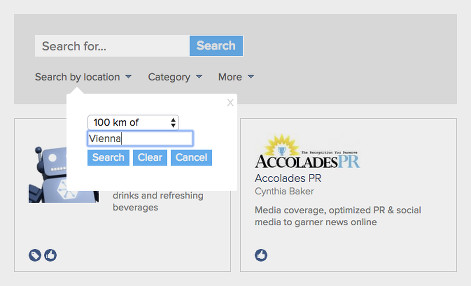
After installation, you may need to customize your Squarespace directory presentation or directory search. Here are some options:
- Add tags or labels: Identify members with specific credentials, industries, or service types.
- Implement filtering and search options: Enable search by label or custom fields at MembershipWorks > Customization > Directory Search). By default, most directories will provide a search field to allow directory listing lookup to locate a specific listing. For location searches, decide if you are using kilometer or mile measurements.
- Enable self-tagging: Allow members to add tags or labels to their own profiles.
- Incorporate custom fields: Customize the signup process (MembershipWorks > Customization > Member Sign-up) and display additional fields in directory listings.
- Create specialized directory pages: You can create separate pages for each membership level or tag. enhancing organization and accessibility.
See customization instructions.
Identifying the best Squarespace directory plugin

Consider the following factors when selecting a Squarespace directory plugin:
- Features: Ensure the plugin aligns with your requirements.
- Security: Prioritize plugins with robust security measures.
- Price and support: Evaluate the cost-effectiveness and availability of support options.
While several options exist, choose a Squarespace membership plugin that integrates directory functionality seamlessly.
Features to expect with a directory plugin
Typical features include:
- Directory display options
- Public or private directory settings
- Search functionality
- Map feature
- Customizable profile displays
- Member self-editing capabilities
- Custom fields
- Recommendations or ratings
- Ability to make the directory private and only viewable by fellow members
Directory plugin security and privacy
Security features to look for include:
- Protection against email harvesting
- Protection against spamming directory members with messages
- Secure storage of member data
- Ability to help you comply with privacy regulations such as GDPR and CCPA
Price and support considerations
Directory plugins will vary in their pricing and support options. It’s a good idea to see if the plugin you are considering has a free trial or free plan so that you can test out the system yourself.
MembershipWorks offers both free and paid versions, providing free, unlimited support for both. Support is available by phone, email, and screen share training from agents based in Texas.
In conclusion, integrating a Squarespace directory plugin enhances member engagement, boosts site traffic, provides monetization opportunities, and streamlines administrative tasks. It’s best to choose a plugin that meets your needs in terms of features, security, and support.
Call or email for free support or to request a free screen share training session.
Comments are closed.