
• Home
  • Features
    • Membership Software
    • Member Directory
    • Event Calendar & Registration
    • Member Billing & Online Payments
    • Donations, Shopping Carts & Forms
    • Job Board
    • Announcement Board
    • Classified Ads
    • Members Only Website
    • Website Integration
      • WordPress
      • Squarespace
      • Weebly
      • Without Code
      • Duda
      • Wix
      • HTML5
    • Integrations
    • International
  • Sign Up
    • Pricing & Sign Up
  • Customers
    • Customer Sign In
    • Getting Started
      • MembershipWorks Hosted Website
      • WordPress Plugin
      • Squarespace
      • Weebly
      • Without Code
      • Wix
      • HTML5
    • Customer Websites
  • Developers
    • Find a Developer
    • Create a Developer Listing
    • Manage Developer Listing
  • Demo
    • WordPress Demo
    • Squarespace Demo
    • Weebly Demo
    • Without Code Demo
    • Duda Demo
    • Wix Demo
    • Video Demo of Admin
    • Schedule a Personal Demo
  • About
    • Contact Us
    • Cancel/Suspend Account
    • Schedule a Personal Demo
    • Schedule a Personal Training Session
    • Our Blogs
      • Guides
      • Best Practices
      • Secret Confessions of an ED
      • WordPress with the Light On
    • New Features
    • Careers
    • System Status
Schedule Demo

Discover our membership software with a one-on-one personalized demo:

Schedule a Demo
CMS Integrations

Integrate with WordPress, SquareSpace, Weebly and more.

Learn More!

Upgrade/Downgrade Activity for Membership Dashboard

Posted on Aug 10, 2018 by MembershipWorks
Mar 18, 2020
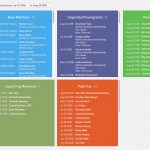
membership activity on Membership dashboard

In addition to New Members, Renewals, Upcoming Renewals and Past Due, the Membership Dashboard will now also display Upgrades/Downgrades. This box will let you quickly see which members upgraded or downgraded their accounts within the selected date range. You can also click on the “Upgrades/Downgrades” title to pull up the members in that box for . . . read more

New Improved Dashboard

Posted on Jul 31, 2018 by MembershipWorks
Mar 18, 2020
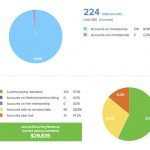
Dashboard with charts

Stats Breakdown of your accounts by account status, membership level, add-ons and labels. Use this to help identify any issues with your membership data, such as accounts with no assigned membership level or renewal date. Click on any line to pull up accounts by status, level, add-ons or labels. Financial Your revenue information by date . . . read more

View/Print/Email Receipts

Posted on Jul 27, 2018 by MembershipWorks
Mar 18, 2020
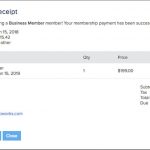
View, print, or email receipts

Administrators can now view, print and email payment receipts. From the member’s account Timeline, click on any payment and select “View/Print” or “Email”. Emails can be sent to the member or to any email address as needed. Members can also print and email payment receipts themselves through a Payment/Invoice History box by clicking on the . . . read more

Record Renewal Button

Posted on Jul 24, 2018 by MembershipWorks
Mar 18, 2020
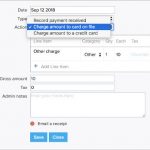
Record renewal payment on member's timeline

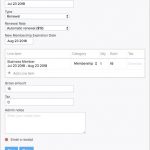
The record renewal button makes it easier ​to record renewals for members paying by check and cash. Click on the Record Renewal button on the member’s timeline and select the appropriate renewal rate, then verify the new membership expiration date and payment amount (which can be adjusted as necessary). You can also trigger an email . . . read more

Import Membership Add-ons

Posted on May 23, 2018 by MembershipWorks
Jan 16, 2020
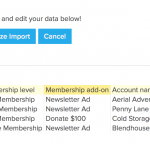
import member data with membership add on

You can now import Membership Add-ons when you import or bulk update your members. For directions on importing please see MembershipWorks > Help > Membership > Importing Members. Note that you cannot update membership add-ons for a member who is on automatic recurring billing.

Link/Re-Link Event Registrations/Form Checkouts to an Account

Posted on May 21, 2018 by MembershipWorks
Jan 17, 2020
link event registrant to a member account

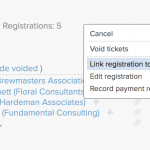
Sometimes an event registration/form checkout is not linked correctly to a member’s account because the wrong email address was used during checkout, or because there are multiple accounts with the same email address. Admins can now link/re-link the registration/checkout to the correct account.​ From the event/form dashboard, click on “Edit/Refund” or “View/Void”, then select “Link registration . . . read more

​Member Location Search Distance in Kilometers

Posted on May 10, 2018 by MembershipWorks
Jan 8, 2020
directory search by kilometer range

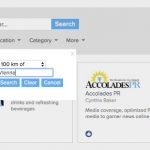
The location search box on your member directory will now show the distance automatically in Kilometers for all organizations outside of the US, United Kingdom, Myanmar and Liberia (based on your organization address).

Improved Documentation for Required Waiver/Term Fields

Posted on May 8, 2018 by MembershipWorks
Jan 16, 2020
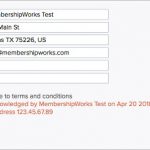
member terms and conditions field

Required waiver/term fields will now record the account name, date/time and IP address of when the acknowledgement is submitted. Note that this data is not available on older records.

Processing a Right to be Forgotten Request from a Member

Posted on May 7, 2018 by MembershipWorks
Apr 3, 2025
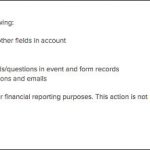
processing a request for the right to be forgotten

The General Data Protection Regulation (GDPR) gives members the right to request the erasure of their personal data from your membership database for specific reasons. We’ve developed a Anonymize/Erase Personal Data feature to help organizations comply with such requests. When you anonymize an account, we will: Erase all fields in the account and set the . . . read more

Embed Tags in Scheduled/Reminder Emails

Posted on May 3, 2018 by MembershipWorks
Jan 9, 2020
embed tags in scheduled/reminder emails

Add more personalization to scheduled/reminder emails by embedding names, addresses, custom fields, membership level, expiration dates and more. Simply click on the “Tags’ dropdown in the editor to select the information you want to insert into your email.

NextPrevious
  • Home
  • Features
  • Sign Up
  • Customer Sign-In
  • Terms of Service / Privacy
  • Cookie Notice
  • Developers
  • Contact