
Add Itemized Table to Renewal Notices

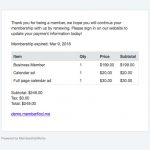
Create better looking member renewal notices by using the [itemtable] tag to add a table that displays the list of membership level/add-ons, prices and subtotal.

Create better looking member renewal notices by using the [itemtable] tag to add a table that displays the list of membership level/add-ons, prices and subtotal.
The General Data Protection Regulation (GDPR) is an EU law that protects the data and privacy of all individuals within the European Union. GDPR applies to all organizations have users in the EU, even if your organization is not located within the EU. In order to execute our function as your Data Processor, MembershipWorks has . . . read more

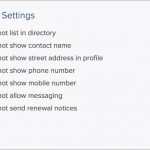
You can disable upcoming and past due renewal notices for individual members by adding the “do not send renewal notices” field to your membership templates.

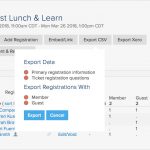
When you export from the event’s dashboard you can now select which tickets to include in the export. This is great for creating lists for different tickets.

The following new tags have been added for the directory profile template: [joi] for the join date [end] for the next renewal date [lvl] for the membership level [aon] for membership add-ons

Drag and drop to reorder your event groups; you can easily add new event groups and still keep everything in order.

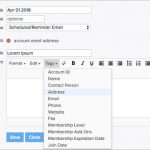
Add more personalization to group emails by embedding names, addresses, custom fields, membership level, expiration date and more. Simply click on the “Tags” dropdown in the editor to select the information you want to insert into your email.
If you need a new form similar to one you’ve already created, you can now copy forms. To copy a form go to the form’s dashboard and click on Copy Form and provide the new form name.

Add a Payment/Invoice History box to the Member Manage template (under Customization) to give your members the ability to view, email, print and pay for their invoices when they log into their account.

Create invoices directly in the member’s timeline to charge for incidentals, additional fees, event silent auction items and more! For more information about invoices please see Help > Membership > Member Billing > Invoices.