



• Home
  • Features
    • Membership Software
    • Member Directory
    • Event Calendar & Registration
    • Member Billing & Online Payments
    • Donations, Shopping Carts & Forms
    • Job Board
    • Announcement Board
    • Classified Ads
    • Members Only Website
    • Website Integration
      • WordPress
      • Squarespace
      • Weebly
      • Without Code
      • Duda
      • Wix
      • HTML5
    • Integrations
    • International
  • Sign Up
    • Pricing & Sign Up
  • Customers
    • Customer Sign In
    • Getting Started
      • MembershipWorks Hosted Website
      • WordPress Plugin
      • Squarespace
      • Weebly
      • Without Code
      • Wix
      • HTML5
    • Customer Websites
  • Developers
    • Find a Developer
    • Create a Developer Listing
    • Manage Developer Listing
  • Demo
    • WordPress Demo
    • Squarespace Demo
    • Weebly Demo
    • Without Code Demo
    • Duda Demo
    • Wix Demo
    • Video Demo of Admin
    • Schedule a Personal Demo
  • About
    • Contact Us
    • Cancel/Suspend Account
    • Schedule a Personal Demo
    • Schedule a Personal Training Session
    • Our Blogs
      • Guides
      • Best Practices
      • Secret Confessions of an ED
      • WordPress with the Light On
    • New Features
    • Careers
    • System Status
Schedule Demo

Discover our membership software with a one-on-one personalized demo:

Schedule a Demo
CMS Integrations

Integrate with WordPress, SquareSpace, Weebly and more.

Learn More!
MembershipWorkslogo

Import Your Members

Posted on Feb 28, 2013 by Aikmeng KuahJan 16, 2020
The information on this page may be out-of-date, please refer to our Help section for current information.

Importing your members is easy with MembershipWorks. Put your members information into a spreadsheet, save it as a CSV (Comma Separated Value) file, and upload it to us. That’s it! You can import as many or as little members, at any time.

Creating and Saving the Spreadsheet

Your spreadsheet should start with the first row being the titles of the columns. Our system recognizes the following titles:

  • First Name
  • Last Name
  • Name
  • Contact Person
  • Phone
  • Email
  • Website
  • Street
  • City
  • State
  • Zip
  • Label
  • Membership Level
  • Join Date
  • Renewal Date

You do not have to include all of the information, but a name (either name, first name or last name) is required. Note that if an email is not provided, the member will not be able to access his account online. Also note that if you include Membership Level or Label columns, you must have already defined the labels under Labels & Membership, and that the text is an exact match (capitalization matters).

The following are 2 sample spreadsheets for reference. You can also use the sample spreadsheets as a template. Note that there are 2 Label columns in the sample spreadsheet, and you may add more Label columns if required.

Sample spreadsheet with name column
Sample spreadsheet with separate first and last name columns

Once you have entered your member information in the spreadsheet, save it in the CSV format. For Excel, select Save As, then pick CSV (Comma Delimited) as the format.
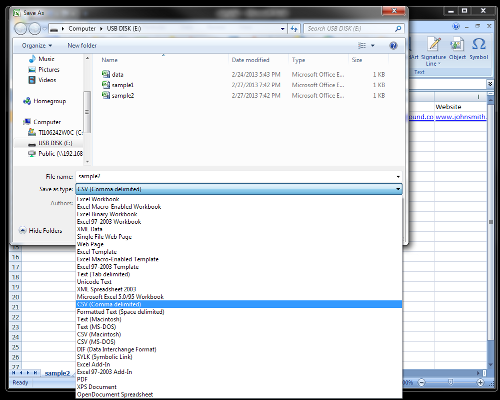
excel-as-csv

Excel may indicate that some features of your spreadsheet are not compatible with CSV, click “Yes” to continue saving it in the CSV format.
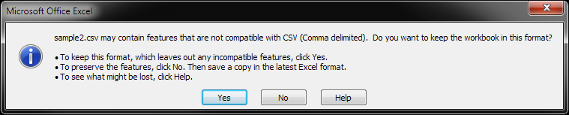
excel-warning

Uploading the File

From the Members folder click on the Import tab. Click on Upload CSV File to upload your member data.
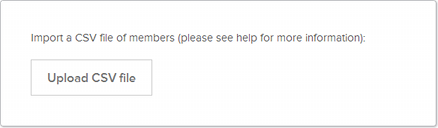
import-members

After uploading the file, the file will be processed and the members added to your Members folder. Take a note of any errors shown in the results.

GoToOlder PostNewer PostAll PostsGuides

About Aikmeng Kuah

I'm co-founder and CTO of MembershipWorks. I've been writing code since the Apple II, in a variety of languages including x86 assembly, 68000 assembly, Pascal, Prolog, dBase, C, LISP, SQL, PHP and Javascript. I work on the full stack, from the web site design, front-end web app, back-end servers, database and API. I am a graduate of Carnegie Mellon University (BS) and University of Texas at Austin (PhD).View all posts by Aikmeng Kuah

Comments are closed.

  • Home
  • Features
  • Sign Up
  • Customer Sign-In
  • Terms of Service / Privacy
  • Cookie Notice
  • Developers
  • Contact