
• Home
  • Features
    • Membership Software
    • Member Directory
    • Event Calendar & Registration
    • Member Billing & Online Payments
    • Donations, Shopping Carts & Forms
    • Job Board
    • Announcement Board
    • Classified Ads
    • Members Only Website
    • Website Integration
      • WordPress
      • Squarespace
      • Weebly
      • Without Code
      • Duda
      • Wix
      • HTML5
    • Integrations
    • International
  • Sign Up
    • Pricing & Sign Up
  • Customers
    • Customer Sign In
    • Getting Started
      • MembershipWorks Hosted Website
      • WordPress Plugin
      • Squarespace
      • Weebly
      • Without Code
      • Wix
      • HTML5
    • Customer Websites
  • Developers
    • Find a Developer
    • Create a Developer Listing
    • Manage Developer Listing
  • Demo
    • WordPress Demo
    • Squarespace Demo
    • Weebly Demo
    • Without Code Demo
    • Duda Demo
    • Wix Demo
    • Video Demo of Admin
    • Schedule a Personal Demo
  • About
    • Contact Us
    • Cancel/Suspend Account
    • Schedule a Personal Demo
    • Schedule a Personal Training Session
    • Our Blogs
      • Guides
      • Best Practices
      • Secret Confessions of an ED
      • WordPress with the Light On
    • New Features
    • Careers
    • System Status
Schedule Demo

Discover our membership software with a one-on-one personalized demo:

Schedule a Demo
CMS Integrations

Integrate with WordPress, SquareSpace, Weebly and more.

Learn More!

Utilizing Event Sessions for a Conference

Posted on Nov 15, 2018 by Karen Kuah
Dec 20, 2019
create session options for event tickets

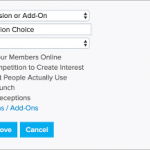
The Ticket Questions / Sessions / Add-Ons feature makes it easy for you to manage breakout sessions at your conference. It can be used to accomplish the following: Allow event registrants to register for conference breakout sessions Charge for sessions Create registrant lists for each session Where to Setup Event Sessions Go to the event’s “Ticketing” . . . read more

5 Pitfalls to Avoid When Choosing Membership Management Software

Posted on Oct 26, 2018 by Karen Kuah
Jun 24, 2020

With so many membership management software choices, it can be difficult to choose the best one for you. We understand moving to a new membership software is both an investment in time and money.  To help you make the most of your resources here are 5 common pitfalls to avoid when evaluating options so you . . . read more

MembershipWorks Themes Compatible with Gutenberg Editor

Posted on Sep 24, 2018 by MembershipWorks
Apr 25, 2024
gutenberg editor columns and other widgets

Customers on our hosting plans (note that hosting is no longer something that we offer to new customers) that are using MembershipWorks themes can now use WordPress’s new Gutenberg editor. Gutenberg is a new visual page editor and builder which you may have seen mentioned on your WordPress Dashboard. Note that the Gutenberg editor is still . . . read more

Retrieve Accounts by Activity and Date Range with Timeline Dashboard

Posted on Sep 19, 2018 by MembershipWorks
Mar 18, 2020
retrieve accounts by activity and date range from Timeline

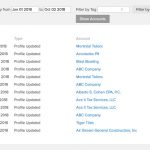
With the Timeline Dashboard you can retrieve member activity by date, type and tag. The new Show Accounts button will allow you to then pull up all accounts shown on the Timeline Dashboard. This will allow you to pull up accounts by activity type. For example, if you set the date range and filter by type . . . read more

Improved Spam Protection for Your Members

Posted on Sep 18, 2018 by MembershipWorks
Jan 16, 2020
message confirmation link for spam prevention

When a non member sends a message to someone listed in your directory they will be required to click a link in a confirmation email before the message is sent. This will reduce the possibility of spam being sent to your members from your directory.

Charge and Record Renewals from Timeline

Posted on Sep 13, 2018 by MembershipWorks
Jan 8, 2020
charge renewals on member Timeline

You can now record and charge a credit card when renewing a member manually from the Timeline, when a member provides their credit card information to you over the phone or in person. Click on “Record Renewal” or “Renew” from the member’s account*, then select “Charge amount to a credit card” under Action. You will . . . read more

Create Charges from Timeline

Posted on Sep 13, 2018 by MembershipWorks
Jan 8, 2020
create charges on member Timeline

Charge a credit card for any payment from a member’s Timeline. If the member is on automatic recurring billing you can charge their credit card on file*, or you can also enter the credit card information directly. To charge a card go to the member’s Timeline and click “Create New Entry”. Under Action, you can . . . read more

Upgrade/Downgrade Activity for Membership Dashboard

Posted on Aug 10, 2018 by MembershipWorks
Mar 18, 2020
membership activity on Membership dashboard

In addition to New Members, Renewals, Upcoming Renewals and Past Due, the Membership Dashboard will now also display Upgrades/Downgrades. This box will let you quickly see which members upgraded or downgraded their accounts within the selected date range. You can also click on the “Upgrades/Downgrades” title to pull up the members in that box for . . . read more

New Improved Dashboard

Posted on Jul 31, 2018 by MembershipWorks
Mar 18, 2020
Dashboard with charts

Stats Breakdown of your accounts by account status, membership level, add-ons and labels. Use this to help identify any issues with your membership data, such as accounts with no assigned membership level or renewal date. Click on any line to pull up accounts by status, level, add-ons or labels. Financial Your revenue information by date . . . read more

View/Print/Email Receipts

Posted on Jul 27, 2018 by MembershipWorks
Mar 18, 2020
View, print, or email receipts

Administrators can now view, print and email payment receipts. From the member’s account Timeline, click on any payment and select “View/Print” or “Email”. Emails can be sent to the member or to any email address as needed. Members can also print and email payment receipts themselves through a Payment/Invoice History box by clicking on the . . . read more

NextPrevious
  • Home
  • Features
  • Sign Up
  • Customer Sign-In
  • Terms of Service / Privacy
  • Cookie Notice
  • Developers
  • Contact